You wrote a Playwright script. It works perfectly in your browser. You run it on a real site and it gets blocked immediately — before you even clicked anything.
Here’s the thing: detection happens before your script does anything. The browser itself gives you away.
This guide walks you through four ways to fix that in 2026.
Why does Playwright get detected?
When a site loads, anti-bot systems check dozens of browser signals in milliseconds. Standard Playwright fails almost all of them:
navigator.webdriveris set totrue— real browsers never have this- The user agent says “HeadlessChrome”
window.chromeis missing or incomplete- Chrome runtime APIs are absent
- Canvas and WebGL fingerprints look nothing like a real browser
- The
pluginsarray is empty
Any single one of these can get you blocked. Together, they make standard Playwright trivially easy to flag. Sites like Cloudflare, DataDome, and Akamai check all of them before your page even finishes loading.
So what do you do about it?
What you need
- Python 3.8+
- Playwright installed
pip install playwright
playwright install chromium
Method 1: playwright-stealth
This is the simplest fix. playwright-stealth is a Python library that patches the most obvious JavaScript-level signals — it sets navigator.webdriver to undefined, fills in missing Chrome APIs, and makes the browser look more like a real one.
pip install playwright-stealthimport asyncio
from playwright.async_api import async_playwright
from playwright_stealth import stealth_async
async def main():
async with async_playwright() as playwright:
browser = await playwright.chromium.launch(headless=True)
page = await browser.new_page()
# Apply stealth BEFORE navigating
await stealth_async(page)
await page.goto('https://bot.sannysoft.com')
await page.screenshot(path='result.png')
await browser.close()
asyncio.run(main())One important thing: apply stealth before page.goto(). If you apply it after navigating, some signals are already sent and the damage is done.
Using it with a browser context
If your script opens multiple pages, apply stealth after creating each one:
import asyncio
from playwright.async_api import async_playwright
from playwright_stealth import stealth_async

async def main():
    async with async_playwright() as playwright:
        browser = await playwright.chromium.launch(headless=True)
        context = await browser.new_context(
            user_agent='Mozilla/5.0 (Windows NT 10.0; Win64; x64) AppleWebKit/537.36 (KHTML, like Gecko) Chrome/124.0.0.0 Safari/537.36'
        )
        page = await context.new_page()
        await stealth_async(page)

        await page.goto('https://bot.sannysoft.com')
        await browser.close()

asyncio.run(main())
When it’s not enough
playwright-stealth only patches JavaScript signals. It does nothing about TLS fingerprints, HTTP headers, or deeper browser internals. For sites running serious anti-bot protection (Cloudflare, Akamai, PerimeterX), this alone probably won’t cut it. You’ll need one of the methods below.
Method 2: Patchright
Patchright is a patched build of Playwright. The difference from playwright-stealth is that Patchright modifies Chrome itself, not just the JavaScript layer. So the browser signals that leak at the network and runtime level are also fixed.
pip install patchright
patchright install chromium
import asyncio
from patchright.async_api import async_playwright
async def main():
async with async_playwright() as playwright:
browser = await playwright.chromium.launch(
channel="chrome",
headless=True
)
context = await browser.new_context(
user_agent='Mozilla/5.0 (Windows NT 10.0; Win64; x64) AppleWebKit/537.36 (KHTML, like Gecko) Chrome/124.0.0.0 Safari/537.36'
)
page = await context.new_page()
await page.goto('https://bot.sannysoft.com')
await page.screenshot(path='result.png')
await browser.close()
asyncio.run(main())The API is identical to standard Playwright. You change one import line — from patchright.async_api import async_playwright instead of from playwright.async_api import async_playwright — and the rest of your code works without modification.
And it supports headless=True reliably, which matters because headless Chrome has different behavior from headed Chrome and some sites specifically look for that difference.
Method 3: Camoufox
Camoufox is a Firefox-based browser built specifically for stealth automation. It goes beyond just patching signals — it actively spoofs canvas fingerprints, WebGL, fonts, screen resolution, timezone, locale, and a lot more, automatically.
pip install camoufox
camoufox fetch
import asyncio
from camoufox import AsyncCamoufox
async def main():
async with AsyncCamoufox(
headless=True,
geoip=True, # matches IP geolocation automatically
humanize=True, # adds human-like mouse movement
) as browser:
page = await browser.new_page()
await page.goto('https://bot.sannysoft.com')
await page.screenshot(path='result.png')
asyncio.run(main())One thing to keep in mind: Camoufox runs Firefox, not Chrome. Most sites work fine, but if your target relies on Chrome-specific APIs, you might hit edge cases. Worth testing before committing to it.
Setting locale and OS
async with AsyncCamoufox(
    headless=True,
    geoip=True,
    humanize=True,
    locale='en-US',
    os='windows',
) as browser:
    page = await browser.new_page()
    await page.goto('https://bot.sannysoft.com')
Method 4: Manual patches with add_init_script
If you want full control over exactly which signals get patched, you can do it yourself using Playwright’s add_init_script. The script runs before any page JavaScript executes, so you’re patching signals before the site even gets a chance to check them.
import asyncio
from playwright.async_api import async_playwright

STEALTH_SCRIPT = """
Object.defineProperty(navigator, 'webdriver', {
    get: () => undefined
});

Object.defineProperty(navigator, 'plugins', {
    get: () => [1, 2, 3, 4, 5]
});

Object.defineProperty(navigator, 'languages', {
    get: () => ['en-US', 'en']
});

window.chrome = {
    runtime: {}
};
"""

async def main():
    async with async_playwright() as playwright:
        browser = await playwright.chromium.launch(headless=True)
        context = await browser.new_context(
            user_agent='Mozilla/5.0 (Windows NT 10.0; Win64; x64) AppleWebKit/537.36 (KHTML, like Gecko) Chrome/124.0.0.0 Safari/537.36',
            viewport={'width': 1920, 'height': 1080},
        )
        await context.add_init_script(STEALTH_SCRIPT)
        page = await context.new_page()

        await page.goto('https://bot.sannysoft.com')
        await page.screenshot(path='result.png')
        await browser.close()

asyncio.run(main())
The downside: you have to maintain these patches yourself. Detection techniques evolve, and what works today might not work in six months.
How do they actually perform? Real benchmark data
I ran all of these engines against real protection systems — Cloudflare, DataDome, Amazon, Akamai, PerimeterX, Kasada, and others — using my open-source browsers-benchmark toolkit.
Here’s what the numbers look like:
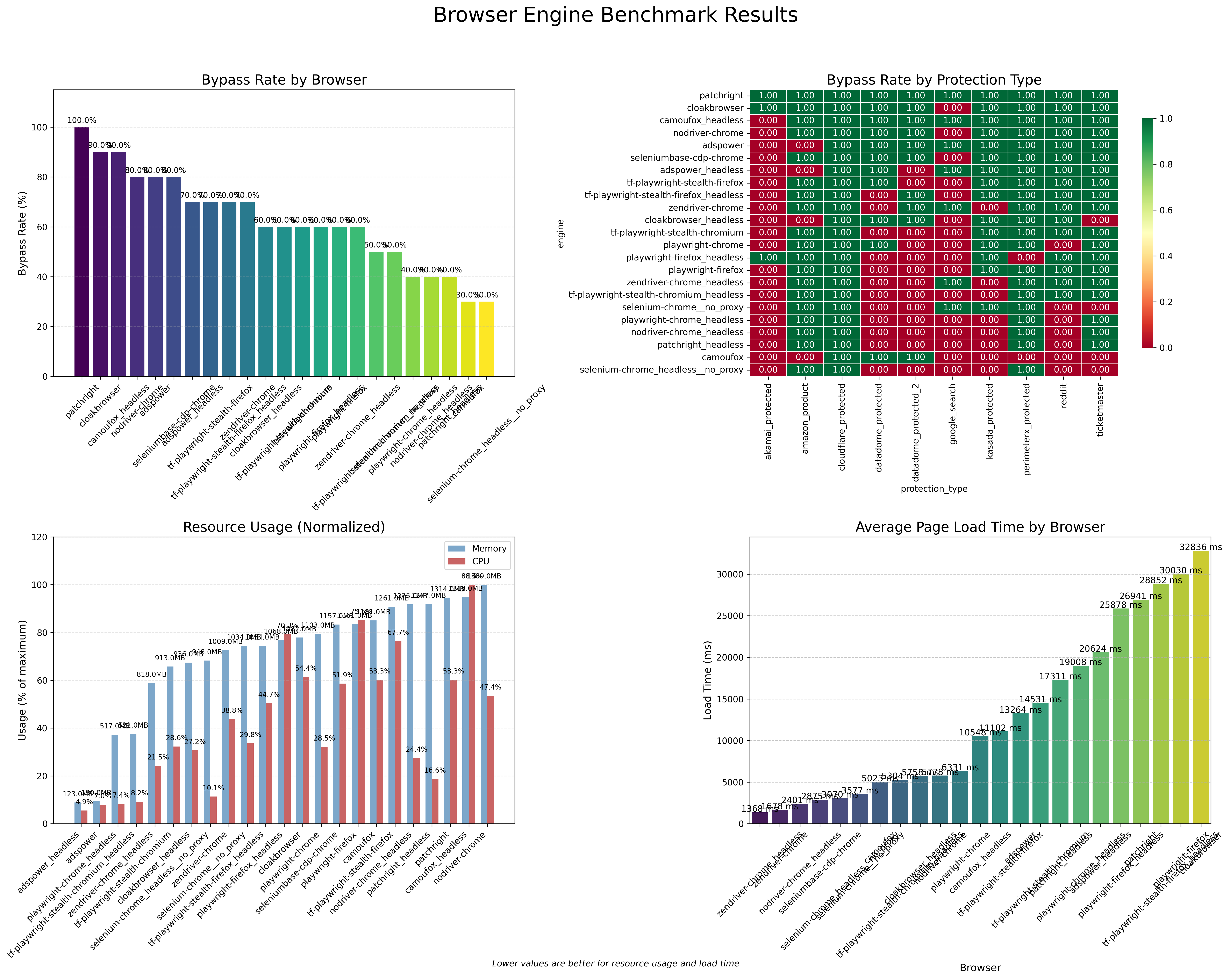
Bypass rate
| Engine | Bypass Rate |
|---|---|
| patchright | 100% |
| cloakbrowser | 90% |
| camoufox_headless | 90% |
| nodriver-chrome | 80% |
| seleniumbase-cdp-chrome | 80% |
| tf-playwright-stealth-firefox | 70% |
| tf-playwright-stealth-chromium | 60% |
| playwright-chrome | 60% |
| tf-playwright-stealth-chromium_headless | 50% |
| playwright-chrome_headless | 40% |
| patchright_headless | 40% |
| camoufox (headed) | 30% |
A few things worth knowing from these results:
- Patchright headed hit 100% across all tested systems. That’s the best result in the benchmark.
- Camoufox headless (90%) scored much higher than Camoufox headed (30%). The headed version had proxy detection issues in this run that skewed it down.
- Standard Playwright with no patches got 60% headed and 40% headless. Not terrible, but not reliable either.
tf-playwright-stealthon Firefox hit 70%, slightly better than the Chromium version at 60%.- Headless consistently scores lower than headed for the same engine. Worth keeping in mind for production setups.
Memory and CPU
| Engine | Memory (MB) | CPU (%) |
|---|---|---|
| playwright-chrome_headless | 517 | 7.4 |
| tf-playwright-stealth-chromium_headless | 522 | 8.2 |
| patchright | 1,314 | 53.3 |
| camoufox_headless | 1,318 | 88.6 |
Patchright and Camoufox use significantly more memory than standard Playwright. If you’re running hundreds of concurrent sessions, that adds up fast.
Full benchmark source: github.com/techinz/browsers-benchmark — or read the full benchmark breakdown for detailed per-protection-system results, load times, and more.
Which one should you use?
| playwright-stealth | Patchright | Camoufox | Manual | |
|---|---|---|---|---|
| Setup difficulty | Easy | Easy | Easy | Hard |
| JS-level patches | Yes | Yes | Yes | Yes |
| Browser-level patches | No | Yes | Yes | No |
| Headless support | Partial | Full | Full | Partial |
| Browser engine | Chrome | Chrome | Firefox | Chrome |
| Bypass rate (headed) | 60% | 100% | 30-90%* | Varies |
| Cost | Free | Free | Free | Free |
*Camoufox headed scored low due to proxy detection issues in the benchmark. Camoufox headless reached 90%.
Here’s a simple way to decide:
- Just starting out or testing something simple? Use
playwright-stealth. Quick to set up, good enough for basic sites. - Need the highest bypass rate and want to stay on Chrome? Use Patchright.
- Targeting sites with heavy fingerprinting? Use Camoufox headless.
- Need to control exactly which signals get patched? Go manual with
add_init_script.
Common issues and fixes
navigator.webdriver still returns true after applying playwright-stealth
You applied stealth after page.goto(). Do it before navigation — once the page loads, the signals are already sent.
Still getting detected on Cloudflare or Akamai
playwright-stealth only fixes JavaScript-level signals. It doesn’t touch TLS fingerprints or browser internals. Switch to Patchright or Camoufox for these sites.
Camoufox crashes on Linux
Run camoufox fetch again. Some Linux distros need extra dependencies — check the Camoufox GitHub repo for the full list.
Headless mode still triggering detection
Some sites check for real GPU rendering. Run with headless=False and use a virtual display (Xvfb on Linux) for server deployments.